The AI Assistants Dashboard View
More guests now ask ChatGPT or Claude where to stay, instead of searching on Google. The AI Assistants view shows whether these tools are reading your website and how many guests visit your site from their answers.
Use it to:
See whether AI assistants can find and read your website.
See which of your pages they read most.
Count the guests who clicked through to your website from an AI answer.
Find simple things you can do to be recommended more often.
How to open it
Step 1: Log in to Springnest Admin and click the Dashboard tab
Step 2: Click AI Assistants in the menu below the tabs

What you’ll see
Section | What it tells you |
|---|---|
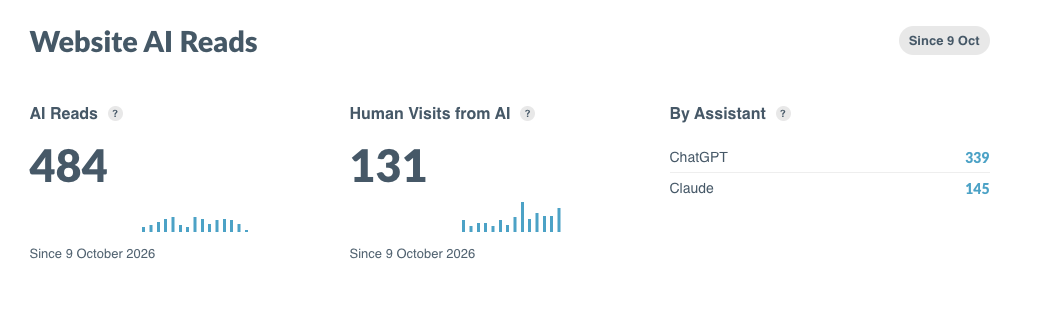
AI Reads | How often AI assistants opened a page on your website while answering someone’s question. More reads mean AI is using your website as a source. |
Human Visits from AI | How many people clicked a link to your website in an AI answer. These are real potential guests. |
By Assistant | Which assistants read your website (for example, ChatGPT or Claude), and how many reads came from each. |
Human Visits from AI by Country | A map and a Top Countries list showing where those visitors are from. |
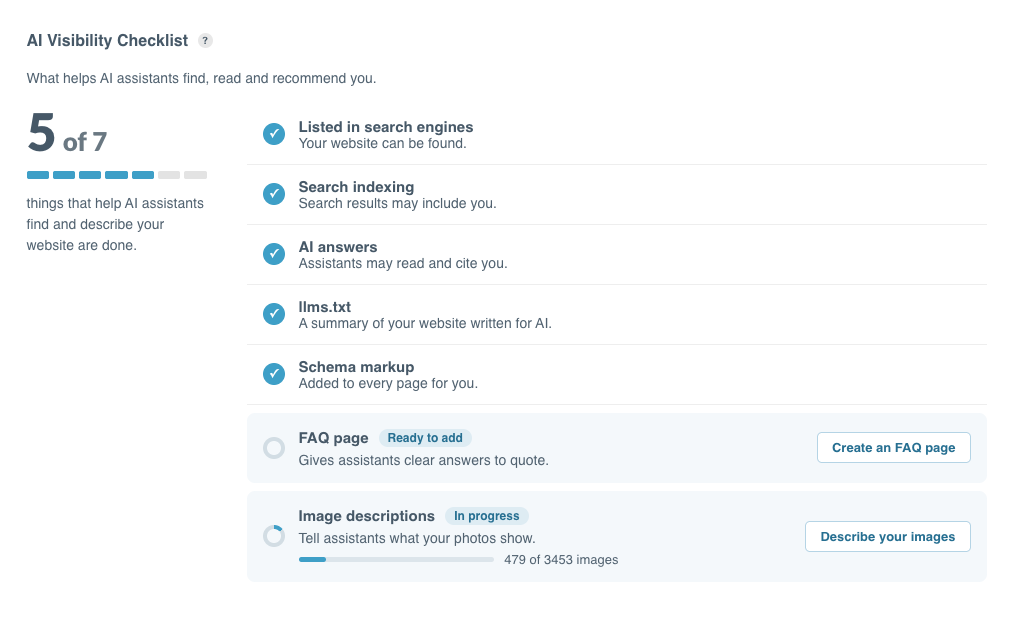
AI Visibility Checklist | The things that help AI find and recommend you. It shows what’s done and what you can still do. |
Top Ten Pages AI Assistants Read | The pages AI reads most. These are the pages giving you the most exposure in AI answers, so keep them accurate and up to date. Click Edit to update a page or View to see it. |
Tip: Your Home page will usually be at the top of Top Ten Pages. If an important page, such as a room or special offer, never appears, check that it has clear, useful information.
Good to know
Counting started on 9 October 2026. You won’t see anything from before that date.
Numbers update once a day. Today’s activity shows tomorrow.
Only genuine AI assistants are counted. Some bots pretend to be ChatGPT or Claude. We check each visit against the list each AI company publishes and leave out the fakes. Your numbers may be lower than other tools show, but they’re real.
Human Visits from AI is likely an undercount. AI assistants don’t always tell us that a visitor came from them, so some of these visits show as normal traffic instead.
Photos aren’t counted. AI may look at your images, but these views aren’t included.
Using your own Cloudflare? If it blocks AI bots, you’ll see zero. AI can’t reach your website, so there’s nothing to count.
What you see depends on your plan. Top Ten Pages isn’t on every plan, and the FAQ page item isn’t on the Essential checklist.
Using the AI Visibility Checklist
Scroll down to the checklist to see your score, for example, “5 of 7”. Springnest takes care of most items for you:
Item | Who does it |
|---|---|
Listed in search engines | Springnest |
Search indexing | Springnest |
AI answers (assistants may read and cite you) | Springnest, on by default |
llms.txt (a summary of your website for AI) | Springnest |
Schema markup (details about your business that AI can read) | Springnest, on every page |
FAQ page | You |
Image descriptions | You, with help from AI |
The two items in your hands make the biggest difference:
Add an FAQ page. AI looks for plain answers to guest questions, like parking, breakfast times or the distance to the beach. Click Create an FAQ page to start.
Describe your images. AI can see a pool, but not that it’s a private heated pool in your villa. Click Describe your images to add alt text, or let AI write it for you and add any details it missed.